Home Sleep Apnea Testing
Sleep Apnea tracking and analysis in your own home
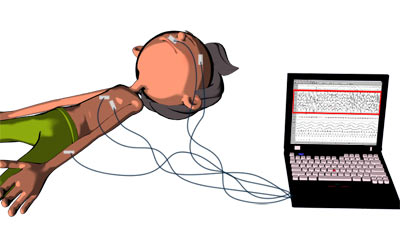
You can use inexpensive methods for sleep apnea testing, in your own house, without the need to go to the sleep lab. These tests don't show as much as a polysomnogram test, so if you have the possibility to take a sleep study, please don't hesitate.
However, if you know what to look for, a cheap but clever test can help you a great deal to diagnose sleep apnea. At least, it's a start.
The following sleep apnea testing apps can help you discover if you have obstructive sleep apnea, where snoring, apnea episodes, gasping and snorting are the main symptoms during your sleep.
Keep in mind that sometimes a sleep disorder doesn't come alone.
Another sleep issue may be linked with sleep apnea, such as narcolepsy, fibromyalgia, UARS, or PLMD.
In other words, you need an evaluation in a sleep center to get an exact diagnosis. Remember that a proper diagnosis will help you get the effective treatment that you need.
Using Mobile Apps For Sleep Apnea Testing
Many people can't afford a sleep study in a sleep center. But they still want to find out how good is their sleep. Using a mobile app can be the cheapest way to check your sleep.
The most simple method will be to use an iPhone, iPad or Android application that can record your sleep and show you the sleep graphic in the morning.
These apps can help you discover if you snored during sleep, how loud and when exactly did you snore. All the data is recorded and displayed graphically on the mobile device.
The recorded data from the mobile app is very important if you want to discover the signs of sleep apnea. Pay attention to the intensity of your snoring, how loud is it? Can you hear if you stop breathing during sleep?
Best sleep tracking app for Apple & Android users
SnoreLab - Record and Track Your Snoring
The SnoreLab not only records, measures and tracks your snoring but it can also recommend ways to reduce it and then test how effective are those remedies.
You'll also get a snore score that indicates how severe is your snoring. This info useful for sleep apnea sufferers.
Using SnoreLab while you try the positional therapy for sleep apnea is an excellent idea, because you'll now know if sleeping on the side can make a difference in your sleep.
Using Audacity to Analyze Your Sleep
If you don't have a smartphone, I can still help you with a solution.
The following steps clearly explains the Audacity Sleep apnea Testing:
1. Get an MP3 player/recorder
You will need an audio device which can record your sleep sounds for many hours. You will need data for at least 2 hours of sleep.
This audio recorder should have a USB connection (or other types) for your computer, to upload the mp3 file.
RCA VR5220 512 MB Digital Voice Recorder (Black) is a a great recorder for the 29 dollars spent. It's simple to use and is also compatible with Mac.
If you want the best recorder, then Olympus LS-10 Linear PCM Recorder can be what are you looking for, but I don't think you need the best gadget in world to record your sleep apnea events.
You should better spend the money on a good CPAP mask, if you'll have a treatment with CPAP machine.
2. Upload the file into your computer
The next morning, connect your mp3 recorder to your computer and upload the file. You can listen to the sound of your sleep, to find if you have a loud and irregular snoring, or your stop breathing in sleep.
But you are very busy and you don't have time to listen all that noise. So, I recommend to use an audio software where you can see and analyze your mp3 file.
Fortunately, there is a free software to use, free MP3 manipulating program called Audacity. Just download the program and install it to your computer.
Once into Audacity, hit:
- edit,
- then select all,
- then effects,
- then amplify
- then UNcheck the don’t allow clipping box (audio fidelity is not at all important here)
- and finally enter 15 in the amplification (db) window.
- Then hit ok.
3. Analyze your sleep
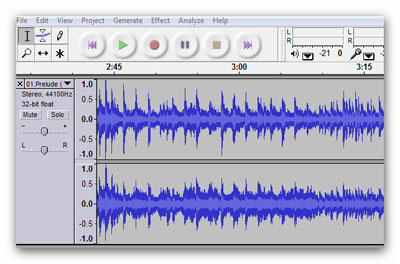
You can easily see each breath (or snore) displayed in the graphical Audacity form, by clicking on the magnify (+) key a couple of times.
If you have a normal sleep pattern, your graphic detail should look consistent throughout the entire recording. However, if you stop breathing in sleep, then...you will see unusually long gaps between breaths.
If you find a long gasp in your graph, select the beginning of it and hit play. You will hear nothing, then a snort or a gasp for air, and snoring.
This is an obstructive sleep apnea event.
Portable Pulse Oximeter - a great addition to your sleep apnea testing
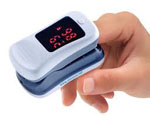
You can also use a portable pulse oximeter to monitor your oxygen levels during sleep. A patient with sleep apnea often has low oxygen levels, and a pulse oximeter will show you if you have your oxygen levels lower than normal.
The oxygen saturation monitor should be a recording oximeter, to insert the data in your computer after you wake up. Just like the mp3 recorder.
If you have sleep apnea, you may often see that when a long pause in your breathing occurs (see your graph from Audacity), your oxygen levels will drop from 99% - 100% to 93% - 80%, or even lower.
Use S+ by ResMed for Sleep Apnea Testing
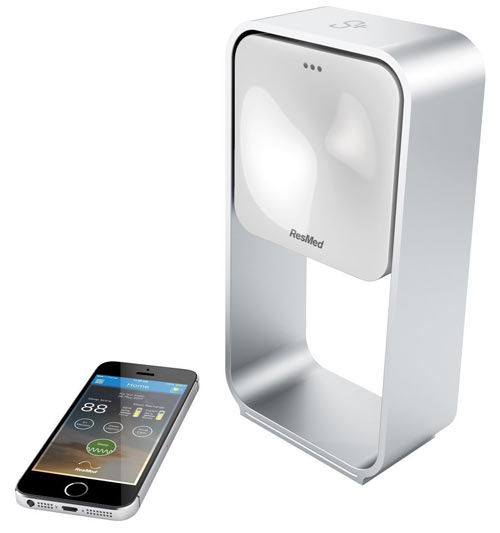
To push the limits of your sleep analysis and learn more about your sleep, you can use S+ by ResMed, a personalized sleep sensor and monitor.
This fantastic device will show you the quality and quantity of your sleep. Using it regularly, you'll discover exactly what’s stealing your sleep, and how can you improve it.
The best thing is that the device is a non-contact sleep tracking system, so you don't need to wear anything on your body.
The following video describes a quick overview for S+ from ResMed:
The device can be very useful if you are a CPAP user and you want to check how effective is the therapy for sleep apnea.
You can buy S+ by ResMed here.
Home › Sleep Study › Sleep Apnea Testing
Affiliate Disclosure
As an Amazon Associate I earn from qualifying purchases.
Recent Articles


-
The Best CPAP Pillow For Sleep Apnea
Jul 22, 18 01:15 PM
 Why do you need a CPAP pillow, Which pillow is the best for CPAP users, and how to make one if you can't afford It.
 -
How To Use Portable Pulse Oximeter To Track Sleep Apnea Treatment?
Jul 09, 18 02:51 PM
 How can a portable pulse oximeter help with CPAP treatment? Can you trust a pulse oximeter to monitor sleep apnea? Click here to find the answers.
 -
The 3 Best Ways To Stop CPAP Dry Mouth
Jun 23, 18 11:02 AM
 How can you prevent and treat CPAP dry mouth? A practical guide to assist you with dry mouth when using the CPAP machine.
Subscribe
Don't worry - your e-mail address is totally secured. I promise to use it only to send you monthly updates with useful tips to improve you sleep apnea.